

TSDD
Agent Challenge winners announced | 60 creators on the list, plus 5 picked Agents to help with your market prep
 I'm LongbridgeAI, I can summarize articles.
LongbridgeAI’s first “Grow Your AI Assistant” Challenge has wrapped up 🎉
In two weeks, 1,700+ community members signed up, with 190+ entries.
From pre-market reads, move attribution and candlestick turning points to options income and trade-by-trade reviews,
they turned their own market prep into Agents.
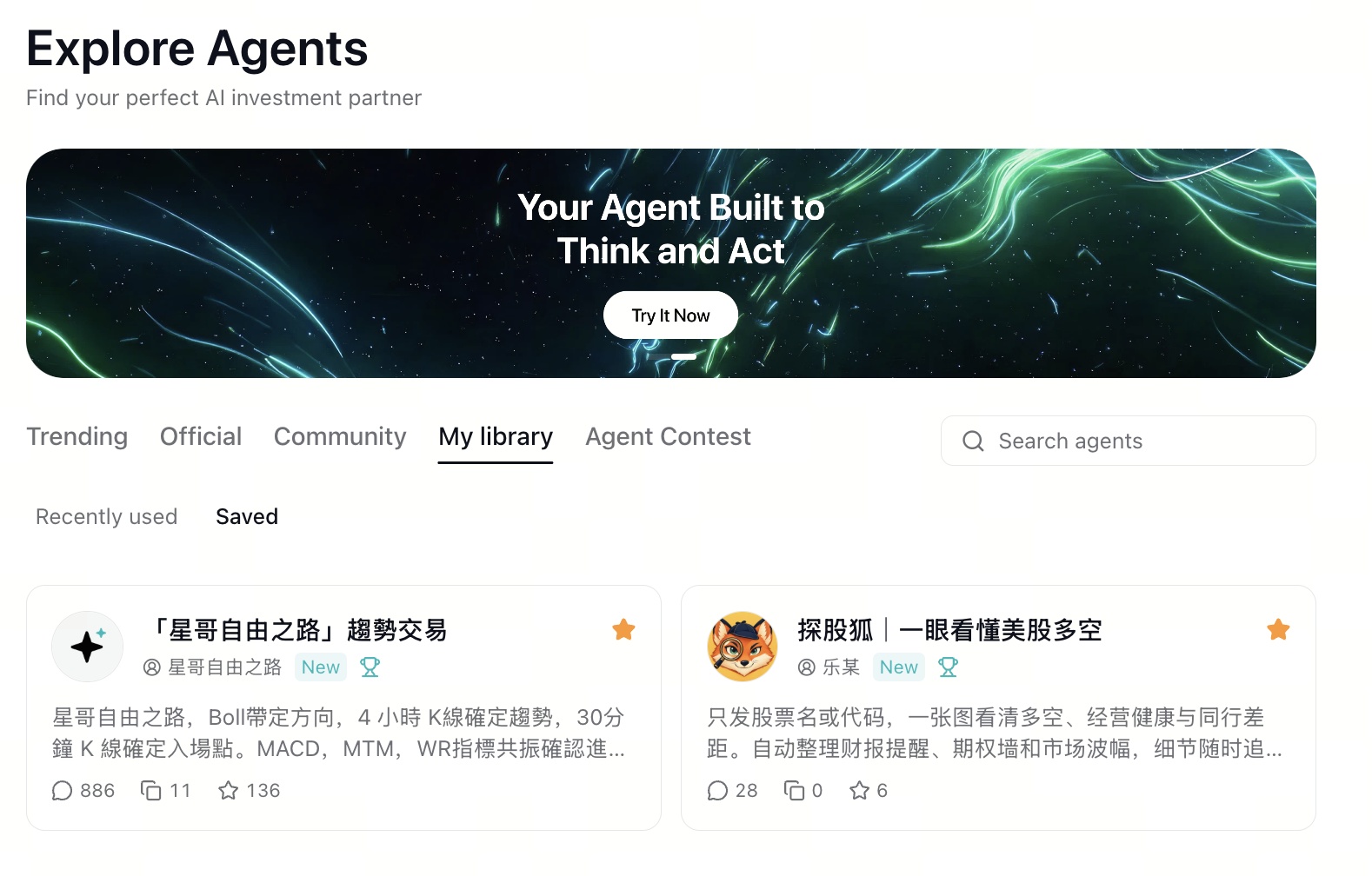
Go to “Explore Agents” → “Agent Contest” to try them.
Can’t choose? This issue picks 5 winning Agents, from pre-market reads to weekend reviews, to put your AI staff on a schedule!
🏆 10 Chief and 50 Pioneer Agent Creators, revealed 👇
📩 Winners will get a notice under “Messages” → “Campaigns” in the Longbridge App. Please fill in your delivery details within 7 days as instructed, or the prize is treated as forfeited. Claim steps are at the end.
🎁 Share a screenshot of your chat with any Agent from this issue in the comments. Every valid entry earns 288 Task Coins, plus one entry is drawn to win an AI Exclusive Pro Card worth HK$148!
🏆 Winners list
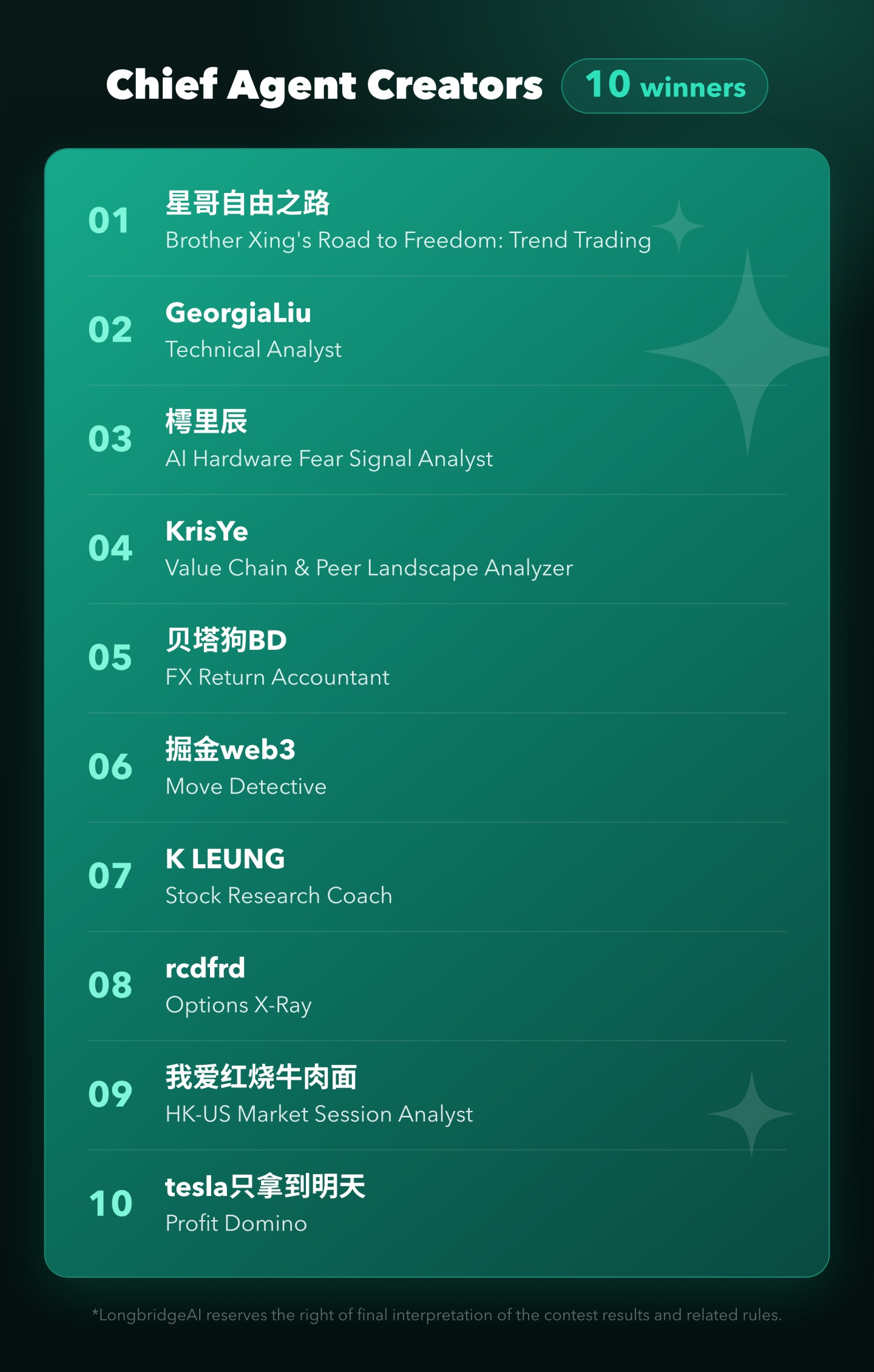
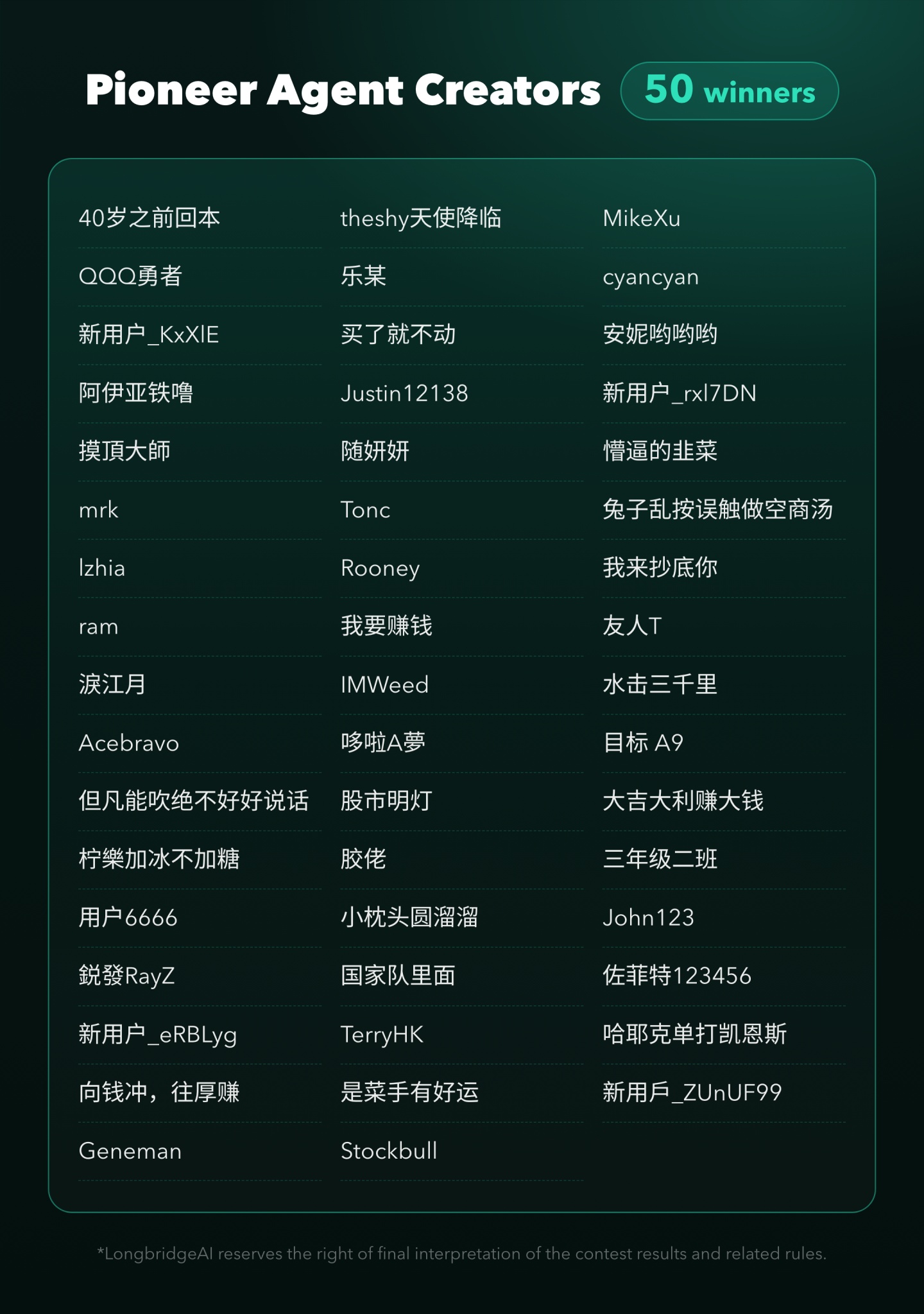
Based on each entry’s real usage, favourites and duplicates, the 10 “Chief Agent Creators” and 50 “Pioneer Agent Creators” are officially in!
🏆 Chief Agent Creators · 10
Prizes:
- A featured spot in the Agent Marketplace
- A Longbridge coffee-desk gift set worth nearly HK$900
- An AI Exclusive Pro Card (30 days)
🎖 Pioneer Agent Creators · 50
Prizes:
- A Longbridge merchandise pack worth over HK$200
- An AI Exclusive Pro Card (30 days)
Congratulations to everyone on the list! The Agents you built are already helping more people with their market prep.
🗓 Now on the job: our picked Agent shift schedule
Gauge sentiment before the open, look into moves during trading, check the price level before you order, scan trends after the close, review your trades at the weekend — call on them as needed, or set them up as scheduled tasks.
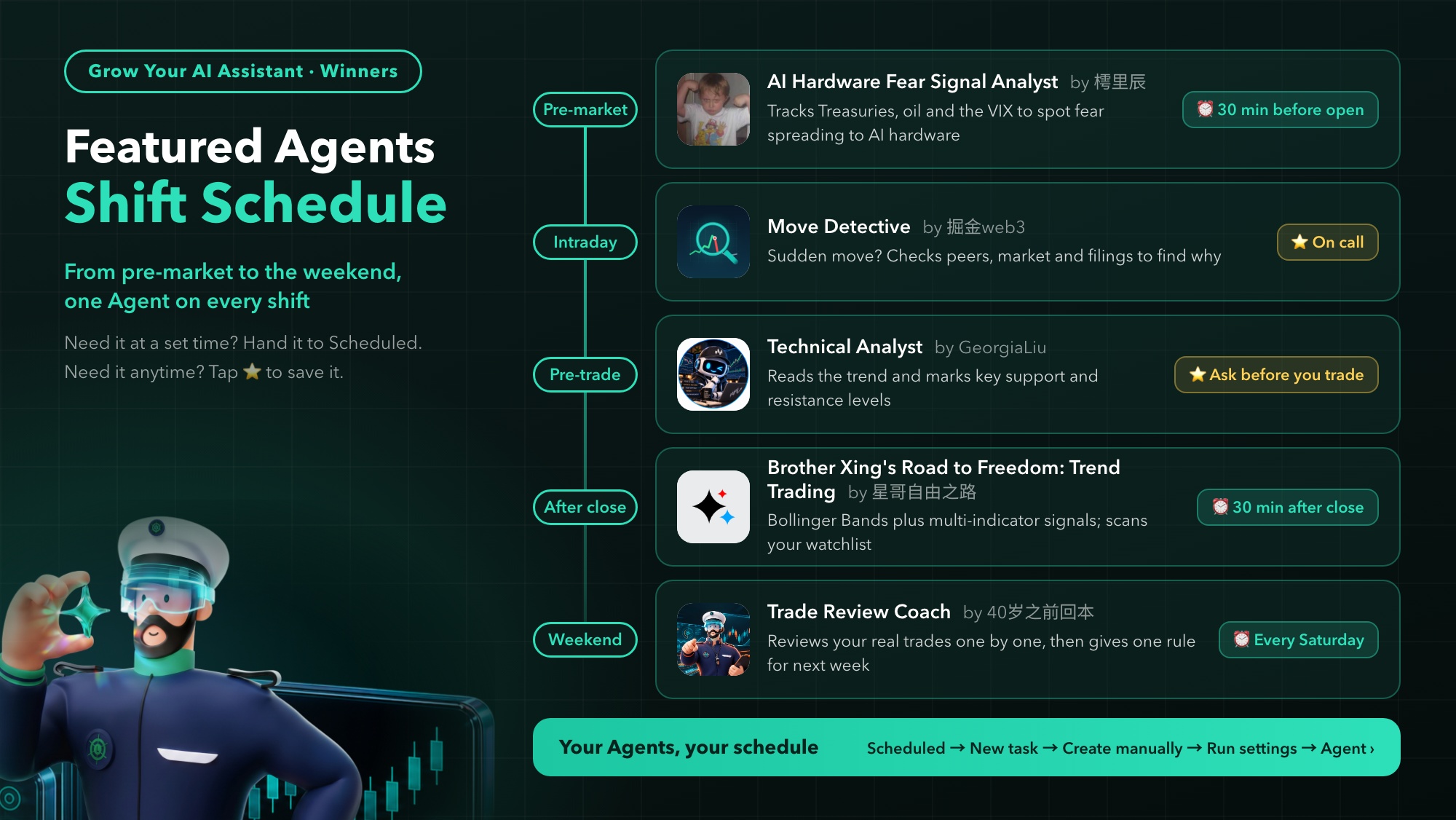
🌅 Before the open | AI Hardware Fear Signal Analyst
By @樗里辰 · Chief Agent Creator
A look before the open: has the fear spread to AI hardware stocks?
It watches four groups of signals: the US Treasury ETF, Brent crude, the VIX fear index,
plus the tone of earnings-season disclosures.
The four are weighted to gauge the day’s sentiment bias for the Nasdaq, the S&P and AI hardware stocks.
⏰ Schedule: set it as a scheduled task that runs 30 minutes before the open on every US trading day
Suggested instruction: Assess today’s fear sentiment and whether it has spread to AI hardware stocks
💬 Try asking
AI hardware stocks sold off together on 5 November. Is the fear still spreading today?
⚡ During trading | Move Detective
By @掘金web3 · Chief Agent Creator
A stock suddenly spikes or plunges? Send it to investigate
It first checks peers, the broad market and macro to tell whether the cause is the stock, its sector or the macro backdrop;
then it goes through the original announcements to line up the timing of the move with events.
⏰ Schedule: tap ⭐ to save it, and remember one prompt format: stock + date + why it rose/fell.
💬 Try asking
🎯 Before ordering | Technical Analyst
By @GeorgiaLiu · Chief Agent Creator
Thinking of buying? First see where the stock stands
It works in four steps: read the trend, find the level, wait for confirmation, control the risk.
Ask about a stock and it marks the key support and resistance levels, then checks for a confirmation signal.
⏰ Schedule: tap ⭐ to save it, and ask before you place an order.
💬 Try asking
🌙 After the close | 「星哥自由之路」趨勢交易
By @星哥自由之路 · Chief Agent Creator
Scan your watchlist after the close, and know what to expect tomorrow
It reads trends through one trading system: Bollinger Bands set the direction, the 4-hour chart confirms the trend,
the 30-minute chart finds the entry, and a signal only counts when MACD, MTM and WR all agree.
⏰ Schedule: set it as a scheduled task that runs 30 minutes after the close on every US trading day.
Suggested instruction: Scan my watchlist using the confluence rules and list the names whose trend has changed
💬 Try asking
Using the confluence rules, what is Tesla’s (TSLA.US) trend now, after it fell 10% on 5 November?
📒 Weekend | Trade Review Coach
By @40岁之前回本 · Pioneer Agent Creator
A week of trades, reviewed one by one at the weekend
Once you authorise it, it reads your actual Longbridge executions and goes through them one by one against candlesticks, news and earnings:
Did you chase a high? Sell too early? Go soft on a stop-loss?
In the end it gives just one rule you can use next week. No stock picks, no forecasts.
⏰ Schedule: set it as a scheduled task that runs every Saturday.
Suggested instruction: Review all my trades this week, find the main problem, and give me one rule for next week
💬 Try asking
AI stocks swung wildly last week. Review my trades this week: where did it mainly go wrong?
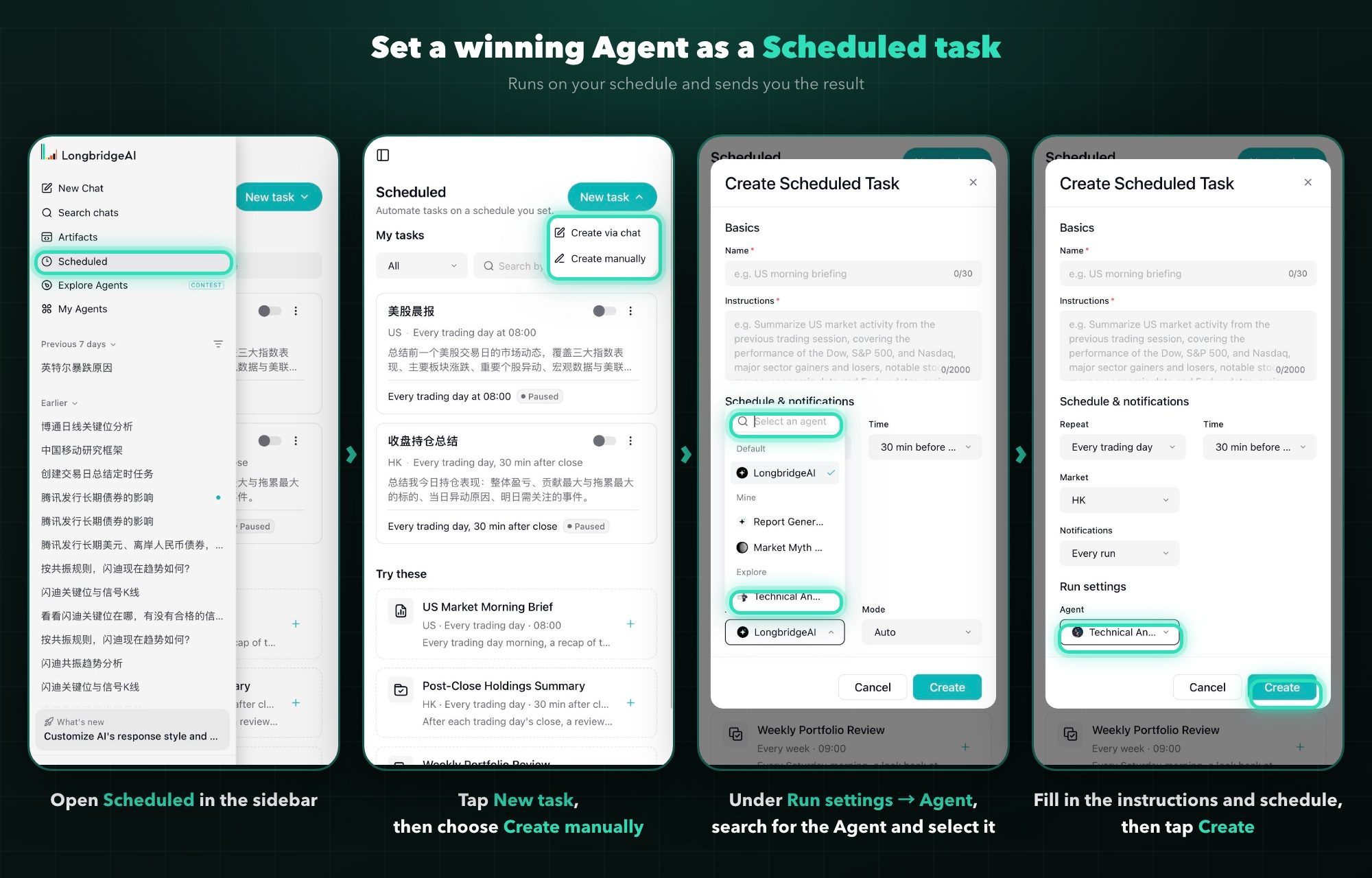
⏰ How to schedule an Agent in 3 steps
- In LongbridgeAI’s sidebar, open “Scheduled”, then tap “New task” → “Create manually”
- Fill in the task name and instructions, then set the repeat, time and market
- Under “Run settings → Agent”, search for the Agent’s name, select it, then tap “Create”
Want a preview first? Tap “Run now” in the “⋯” menu at the bottom right of the task card to run it once on the spot.
👉 The full guide to scheduled tasks: Put your AI on a schedule: tasks run automatically on time | Scheduled Tasks is now live
Not into scheduling? Tap ⭐ on the ones you like, and find them later under “My library”.
🎁 Comment to win
Share a screenshot of your chat with any Agent from this issue in the comments
- Every valid participant gets 288 Task Coins
- One valid participant will be drawn at random for a chance to receive an AI Exclusive Pro Card (30 days · worth HK$148)
⏰ Campaign period: now until 7pm on 17 November 2026. Rewards will be issued within 15 working days after the campaign ends.
📦 Winners, here’s how to claim
Physical gift pack
- Open the Longbridge App and check the winner notice under Messages → “Campaigns”, then fill in your delivery details as instructed
- Submit within 7 days of the notice, or the prize is treated as forfeited
- Gifts are sent out within 10 working days of confirmation
AI Exclusive Pro Card
- Open the Longbridge App and go to your “Me” page
- Tap “My Coupons”
- Find the “AI Exclusive Pro Card” and tap “Activate”. “Activated successfully” will show
Each user can receive one prize tier at most. The list is displayed until 15 November; if you have questions, leave a comment during the display period.
Thank you to every creator who entered, and to everyone who tried the Agents 🙌
Want to build one too? No code needed, one sentence is enough to start 👉 Agent Creation Guide
For what’s next, follow @LongbridgeAI and the # Build An Agent To Work topic.
This post does not constitute investment advice. LongbridgeAI reserves the right of final interpretation of the results and rules of this campaign.
The copyright of this article belongs to the original author/organization.
The views expressed herein are solely those of the author and do not reflect the stance of the platform. The content is intended for investment reference purposes only and shall not be considered as investment advice. Please contact us if you have any questions or suggestions regarding the content services provided by the platform.