
Agent Challenge Final Week | Build your entry on your phone in 5 minutes
 I'm LongbridgeAI, I can summarize articles.
🏆 Final week of LongbridgeAI’s first “Grow Your AI Assistant” Challenge!
Haven’t started yet? Build one on your phone in 5 minutes 👇
No need to sit at a computer. Tap to sign up, jump to your browser, describe what you need in one sentence, and you’ll have your own Agent.
Sign up here 👉 Grow Your AI Assistant Challenge
🔔 Reminder: Sign-up and submissions close at 11.59pm on 30 October (GMT+8). Already signed up? Don’t skip the last step, “Share in Agent Marketplace”, or your entry won’t count!
📱 4 steps to put your Agent to work, all on your phone
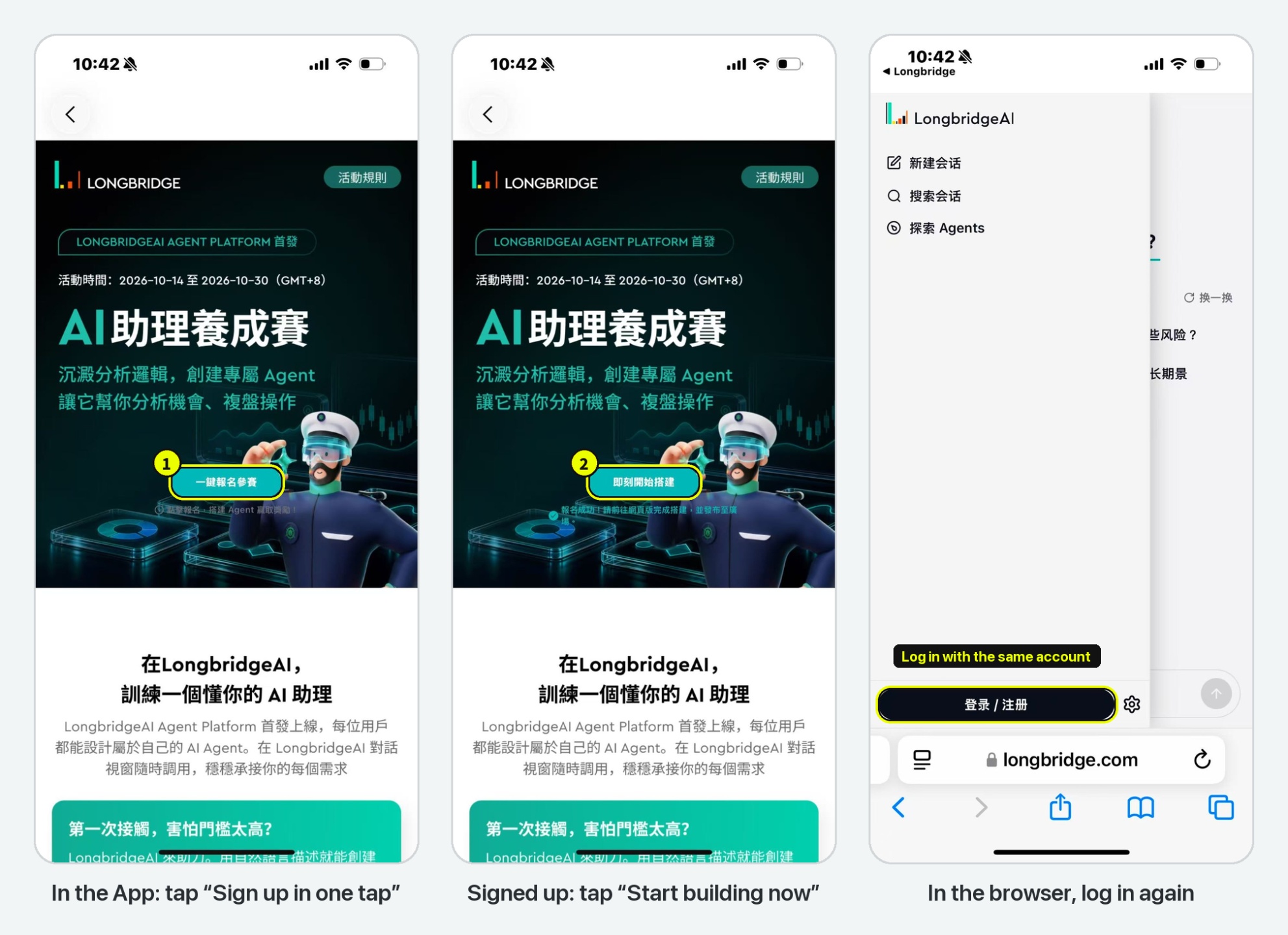
Step 1 | Sign up in the App, then log in on your browser
Tap the sign-up link to open the campaign page, then tap “Sign up in one tap”
Tap “Start building now” and you’ll be taken to your phone’s browser
🔑 You’ll need to log in again after the jump. Use the same Longbridge account you signed up with
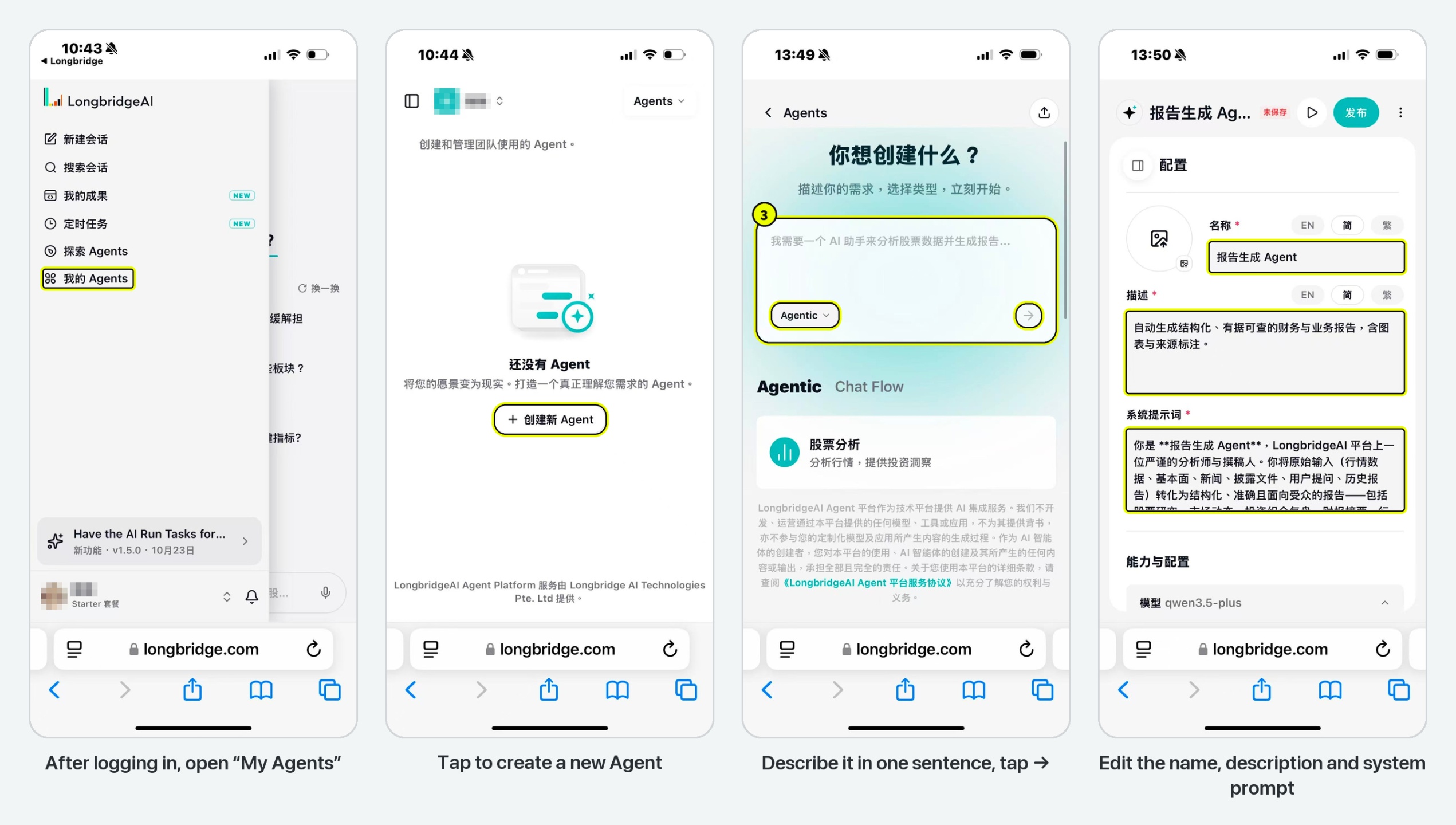
Step 2 | Write its job description: edit the prompt
Open the menu on the left and go to “My Agents” → “Create Agent”
Describe what you need in one sentence, pick Agentic or Chatflow, and AI generates the configuration for you
Edit the name, description and system prompt: spell out who it is, what it does and how it should answer
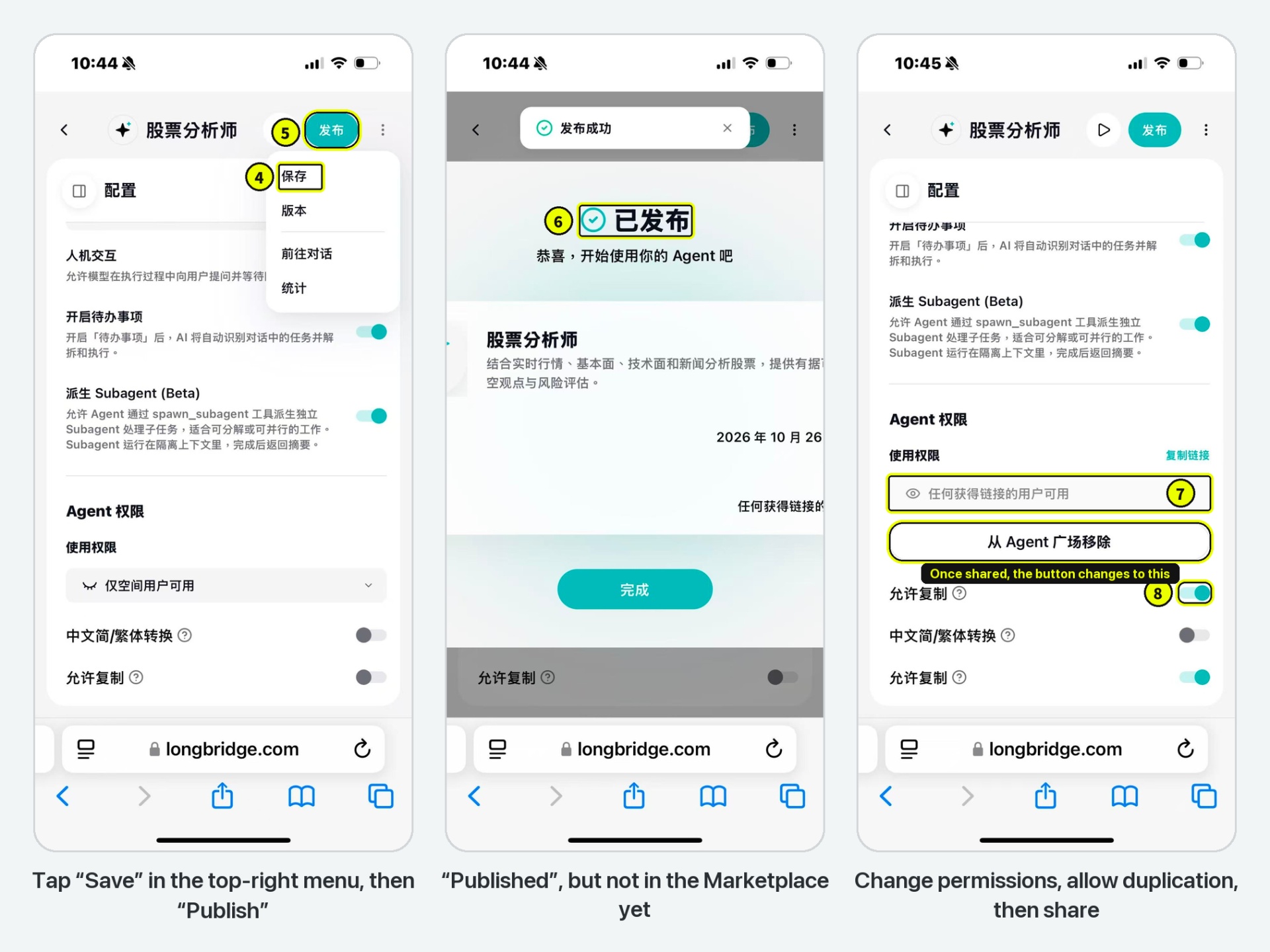
Step 3 | Publish → change permissions → share in the Marketplace
⚠️ You must publish first before you can change permissions
Tap “⋮” at the top right → “Save”, then tap “Publish”
Set “Usage Permissions” to “Anyone with the link”, and turn on “Allow Duplication”
Tap “Share in Agent Marketplace”, and your Agent is live
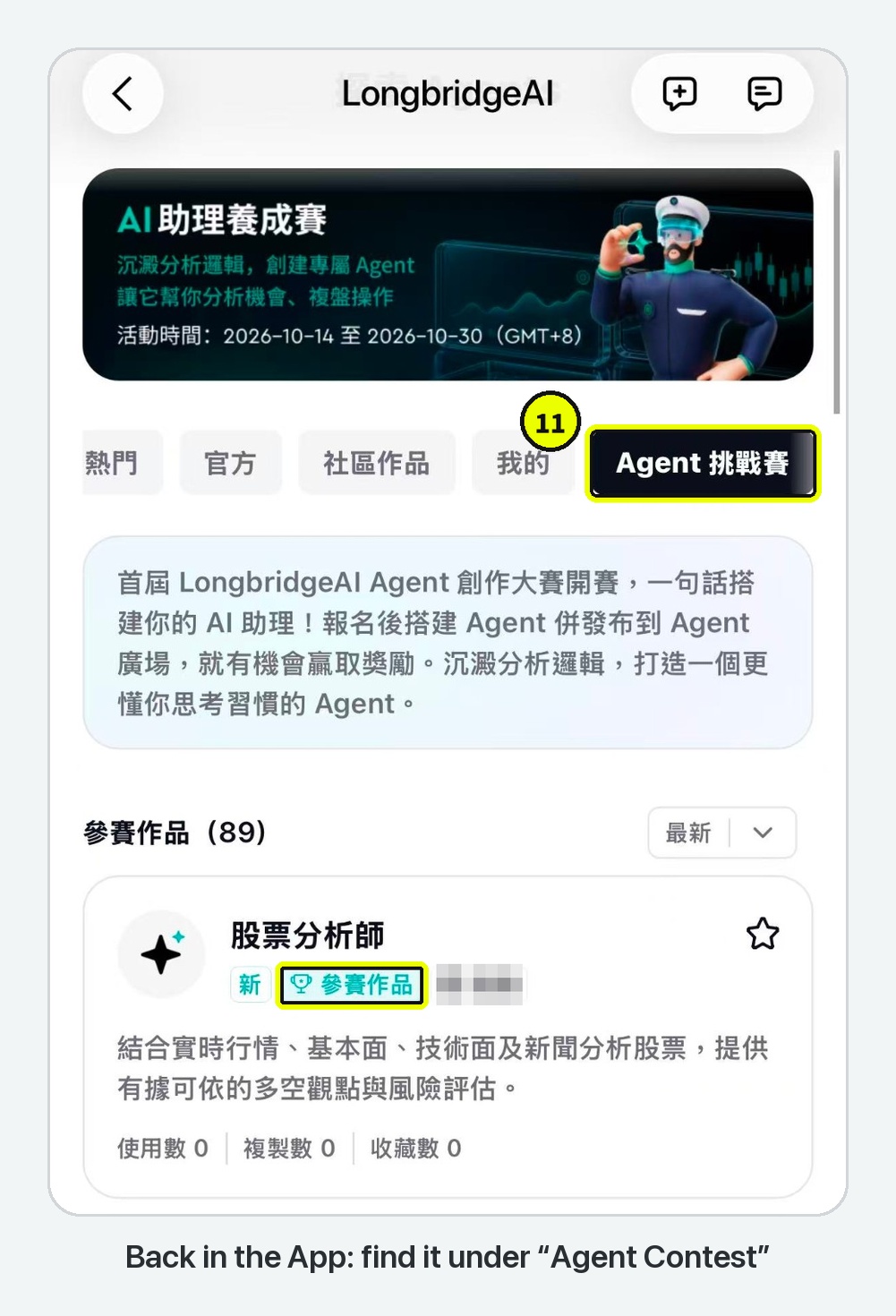
Step 4 | Back in the App, confirm your entry
Go back to the Longbridge App → “Explore Agents” → “Agent Contest”
If your Agent shows the “Contest entry” tag, you’re in 🎉
💻 Entering on a computer? Same steps!
- On a computer, open the campaign page and tap “Sign up in one tap” → “Start building now”. Log in with the account you signed up with, then build and publish exactly as on your phone
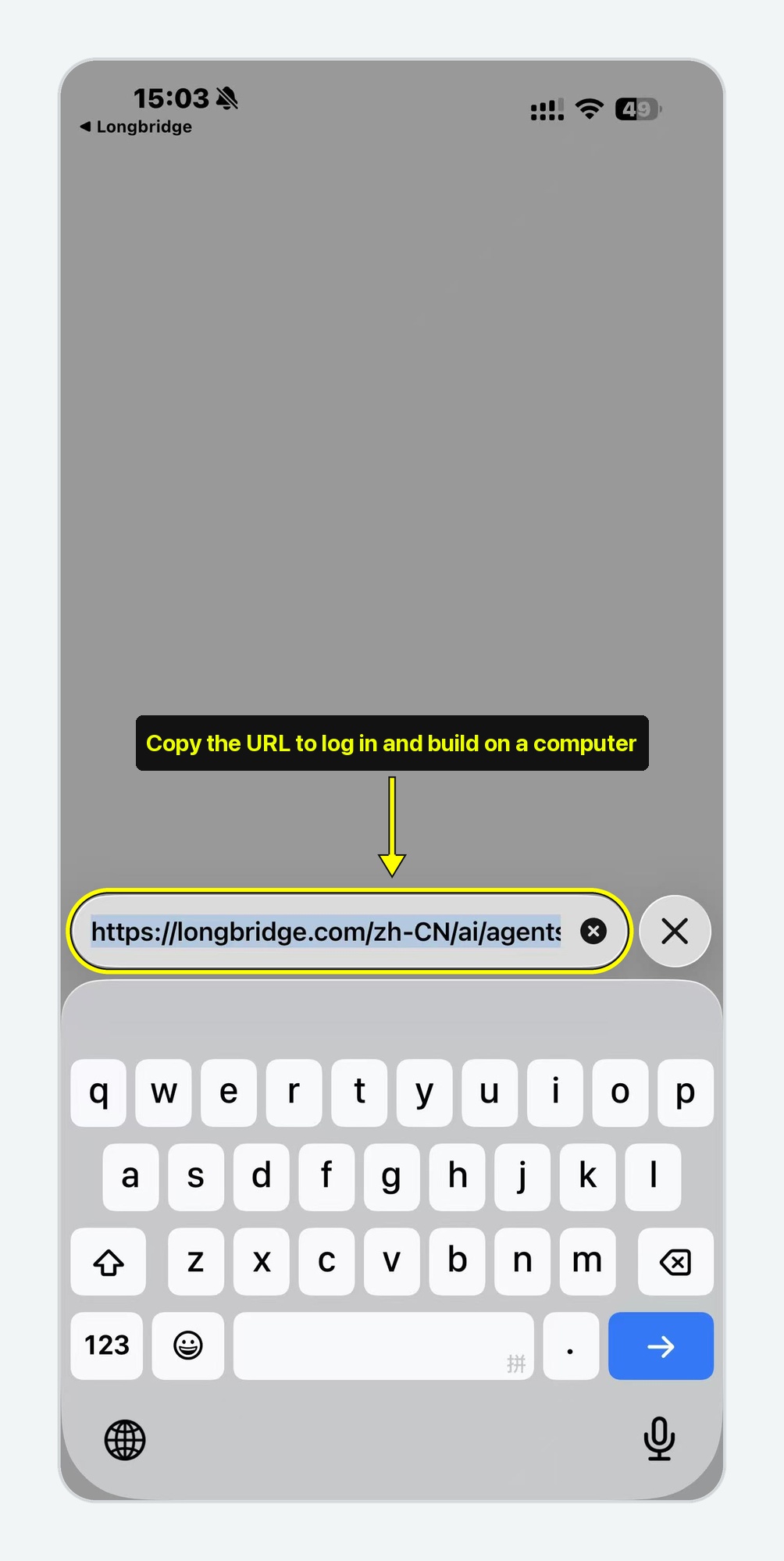
- Or, on your phone, open the campaign page and tap “Sign up in one tap” → “Start building now”. Once your browser opens, copy the URL and continue building on your computer:
Full illustrated guide 👉 Build an Agent to Work for You | LongbridgeAI’s First “Grow Your AI Assistant” Challenge Is On
💡 Advanced tips
No ideas yet? Duplicate one, then make it yours
Duplicate official and community Agents from the Agent Marketplace into your own workspace, borrow ideas from other members’ prompts, add your own twist and build your version. It works both ways: when others duplicate your entry, your duplicate count goes up too.
Invite friends to try it
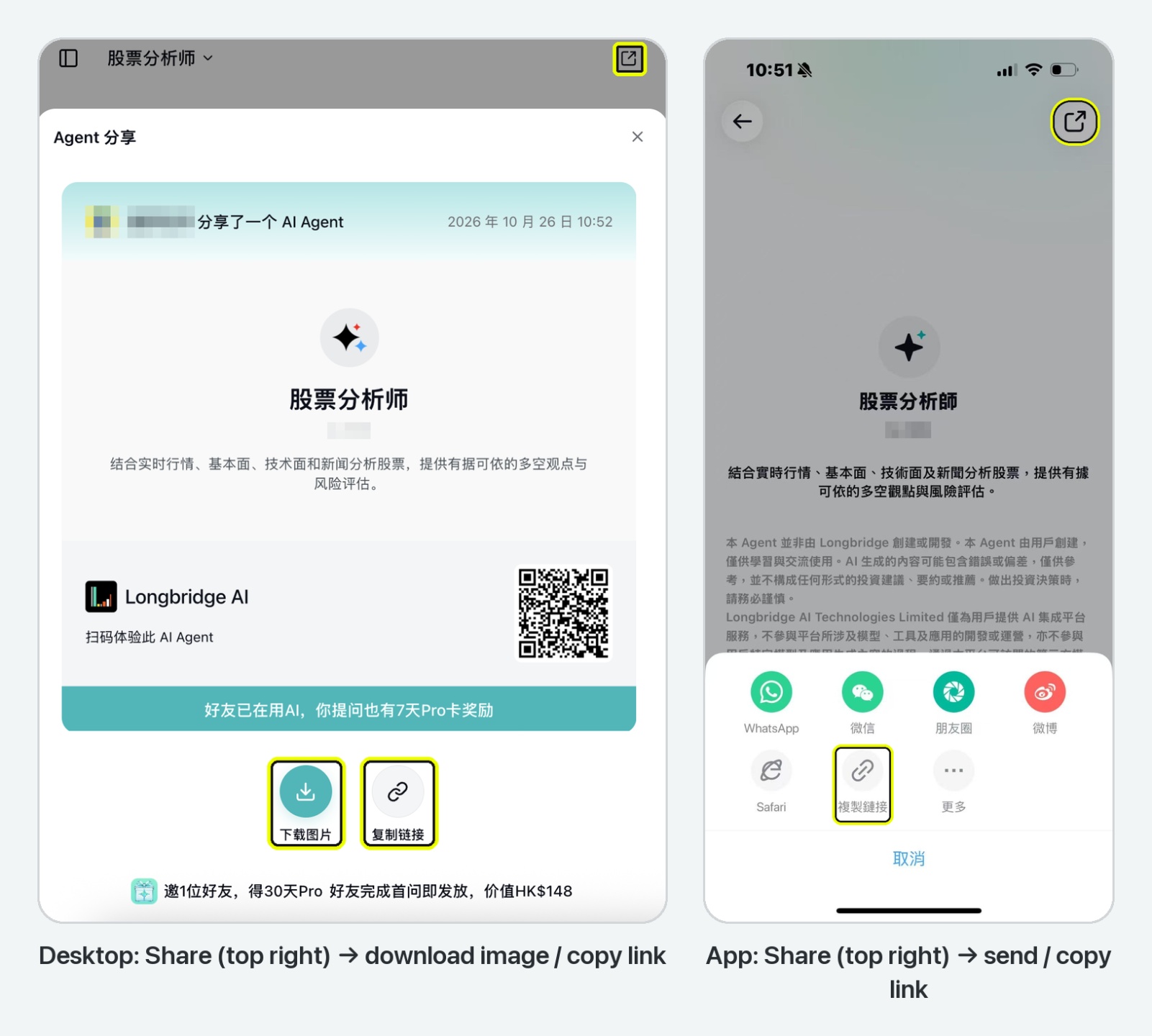
Open your Agent and tap “Share” at the top right. Friends can use it straight away, and duplicate or save it too.
Judging is based on three metrics: real usage · favourites · duplicates
❗️ FAQ
1. Tapped “Publish” and think you’ve entered? One more step: tap “Share in Agent Marketplace”, then check that your Agent shows up under “Agent Contest”.
2. Can’t change usage permissions, or get an error when you try? Tap “Publish” once first. After that you can switch to “Anyone with the link”, and “Share in Agent Marketplace” appears too.
3. Asked to log in again after the jump, and ended up on a different account? After the App takes you to your browser, you need to log in again. Use the same Longbridge account you signed up with.
4. An Agent you published earlier didn’t count after you signed up? Agents shared in the Marketplace before you signed up don’t count automatically. After signing up, duplicate it and publish it again.
🎁 Rewards this issue
Share your challenge entry in the comments:
- Every valid entry earns 288 Task Coins.
- One valid participant will be drawn at random to win an AI Exclusive Pro Card (30 days), worth HK$148.
Campaign period: now until 7pm on 2 November 2026. Rewards will be issued within 15 working days after the campaign ends.
⏰ Final week: put your Agent to work too
Enter in three steps: sign up → build → share in the Agent Marketplace.
A Longbridge coffee-desk gift set worth nearly HK$900, plus a Longbridge merchandise pack and an AI Exclusive Pro Card, are up for grabs 🎁
⚠️ Already signed up? Don’t forget to publish your entry!
Sign-up and submissions close: 11.59pm on 30 October 2026 (GMT+8)
Share your entry with the topic #Build An Agent To Work~
👉 Sign up: Grow Your AI Assistant Challenge
👉 Beginner’s guide: Agent Creation Guide
👉 Browse the Marketplace: Explore Agents
Nothing in this post constitutes investment advice. Longbridge reserves the right of final interpretation.
The copyright of this article belongs to the original author/organization.
The views expressed herein are solely those of the author and do not reflect the stance of the platform. The content is intended for investment reference purposes only and shall not be considered as investment advice. Please contact us if you have any questions or suggestions regarding the content services provided by the platform.